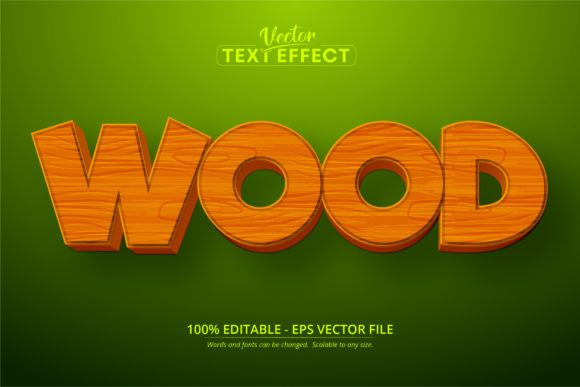
Wood Text, Cartoon Style Text Effect: A Practical Guide for Creative Workflows
In the landscape of digital design, finding a tool that balances artistic flair with technical efficiency is often a challenge. Many designers struggle to find assets that can be integrated into a project without requiring a complete overhaul of their existing workflow. This is where Wood Text, Cartoon Style Text Effect becomes a critical component for professionals who need speed and consistency. It is important to understand immediately that this is not a standard font file like those used in Microsoft Word or basic web browsers. Instead, it is a specialized font effect designed specifically for Adobe Illustrator.
This distinction is vital for anyone planning to use this asset. The product is delivered as an EPS CS6 file format, which means it functions as a vector-based editable template rather than a simple typeface. When you open this file in Adobe Illustrator, you are presented with 100 fully editable text layers. Each layer allows you to customize the content while maintaining the complex wood texture and cartoon-style shading that defines the look. This setup ensures that your text remains scalable to any size without losing quality, making it suitable for everything from small social media icons to large-scale billboard graphics.
Integrating the Effect into Your Creative Process
Understanding where this tool fits within your broader process is the first step toward successful implementation. For freelancers and agency owners, time is often the most valuable currency. Using a pre-made, high-quality effect eliminates the need to manually create wood textures, add drop shadows, and adjust curvature for every single headline. By utilizing Wood Text, Cartoon Style Text Effect, you shift your focus from construction to strategy. You spend less time wrestling with tools and more time refining the message and the visual hierarchy of your design.
The integration happens best during the planning and execution phases of a project. If you are working on a branding package for a children's toy company, a bakery, or a family-friendly educational app, this effect provides an immediate visual language. It signals warmth, approachability, and fun. Rather than searching through stock libraries for images that might clash with your typography, you can apply this effect directly to your headlines. This creates a cohesive brand identity much faster than assembling disparate elements. The workflow becomes linear: import the EPS file, replace the placeholder text with your copy, adjust the kerning if necessary, and export.
Compatibility and Technical Considerations
One of the most common pitfalls in digital asset management is assuming compatibility across different software suites. Because Wood Text, Cartoon Style Text Effect relies on specific Illustrator features, attempting to open it in Photoshop, Canva, or free online editors will likely result in errors or flattened images that cannot be edited. To maintain the integrity of your project, you must ensure that your team has access to Adobe Illustrator, preferably version CS6 or newer. This requirement acts as a gatekeeper for your workflow; it dictates that all final edits must happen within the Adobe ecosystem.
However, once the file is opened and the text is customized, the output versatility is high. Since the effect is vector-based, you can export the final design in various formats depending on the end goal. For print materials like brochures or packaging, you can save as PDF or high-resolution TIFF. For web use, such as landing pages or blog headers, exporting as SVG or PNG ensures crisp edges at any resolution. This flexibility allows the same asset to serve multiple purposes throughout a marketing campaign, reducing the need to recreate designs for different platforms.
Practical Use Cases Across Industries
The utility of this text effect extends far beyond simple graphic design tasks. Entrepreneurs and small business owners often need to produce professional-looking materials without hiring a full-time design team. For a local coffee shop launching a new seasonal menu, using this effect to title the specials board adds a rustic, inviting charm that aligns with the "farm-to-table" aesthetic. Similarly, educators creating worksheets or presentation slides can use the cartoon style to engage younger students, making learning materials feel less rigid and more interactive.
- Marketing Campaigns: Create eye-catching banners for email newsletters or social media ads that stand out in a crowded feed. The textured wood look adds depth that flat colors often lack.
- Product Packaging: Design labels for artisanal goods like soaps, candles, or gourmet foods. The natural wood texture reinforces the idea of organic, handcrafted quality.
- Event Branding: Generate signage for workshops, kids' parties, or community events. The editable nature allows for quick changes to dates and locations without redesigning the entire poster.
- Personal Projects: Hobbyists creating custom gifts, scrapbooks, or DIY crafts can generate unique titles for their projects that look professionally rendered.
In each of these scenarios, the ability to edit the text is the key factor. The 100 editable layers mean you are not limited to a single phrase. You can experiment with different taglines, names, or slogans instantly. This agility is crucial when dealing with client feedback. If a client requests a change in wording, you do not need to start from scratch. You simply select the text object, type the new words, and watch the wood effect automatically adapt to the new character count and spacing.
Maintaining Quality and Consistency
Consistency is the hallmark of professional work. When building a brand or a long-term content series, visual elements must remain uniform. Because this effect is a single file source, every instance of the text will share the exact same texture, lighting, and shadow properties. This eliminates the risk of one headline looking slightly different from another due to manual adjustments. Whether you are designing a ten-page report or a multi-part video series intro, the visual voice remains steady.
Furthermore, the scalability of the effect ensures that your quality control standards are met regardless of the medium. A logo created on a screen looks identical when printed on a large banner because the vectors do not pixelate. This is a significant advantage over raster-based effects that become blurry when enlarged. For users who manage multiple channels, this reliability saves hours of troubleshooting and re-rendering. You can trust that the asset will perform well in any context, allowing you to focus on the content itself.
Optimizing Your Workflow with the Right Tools
To get the most out of Wood Text, Cartoon Style Text Effect, it helps to have a structured approach to file management. Organize your Illustrator files by keeping the original EPS template separate from your working copies. Save your customized versions with clear naming conventions, such as "ProjectName_Headline_v1," to avoid confusion later. This practice is essential for collaborative environments where multiple team members might be accessing the assets.
Additionally, consider how this asset interacts with other design elements. The cartoon style and wood texture are bold visual statements. When pairing them with other graphics, ensure that the surrounding elements do not compete for attention. Simple, clean background colors or subtle patterns usually work best to let the text effect shine. If you are combining this with photography, choose images that complement the warm, earthy tones of the wood texture. This thoughtful composition leads to a more polished final product.
For those who are new to vector editing, the learning curve is minimal. The interface of Adobe Illustrator is intuitive enough that even beginners can navigate the text layers quickly. However, it is worth noting that understanding the difference between live text and outlined text is helpful. While the effect is editable, sometimes outlining the text (converting it to shapes) is necessary before sending files to a printer to ensure the fonts display correctly on their machines. Always check the specific requirements of your production partner before finalizing your deliverables.
Conclusion: A Strategic Asset for Modern Creators
In summary, Wood Text, Cartoon Style Text Effect represents a smart investment for anyone looking to streamline their design process while adding a touch of personality to their work. It bridges the gap between technical limitations and creative ambition. By providing a robust, editable, and scalable solution within the Adobe Illustrator environment, it empowers professionals, educators, and hobbyists to produce high-quality visuals efficiently.
Whether you are launching a startup, managing a classroom, or running a marketing agency, the ability to quickly generate consistent, attractive typography is a competitive advantage. This tool removes the friction of manual creation, allowing you to execute your vision with confidence. As long as you respect the technical requirements of the EPS format and integrate it thoughtfully into your design strategy, this effect will become a staple in your digital toolkit.