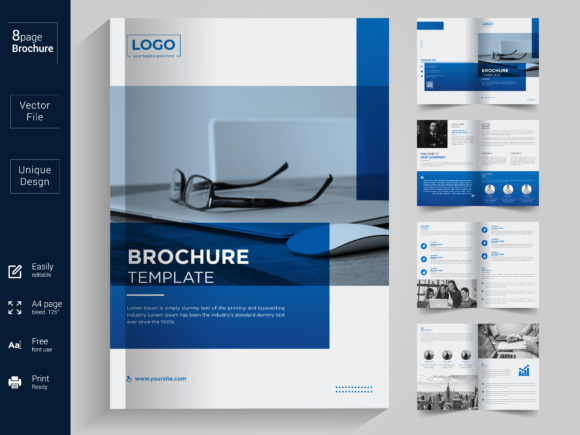
Bi-fold Brochure Design Template: A Practical Guide to Professional Results
In a world where first impressions happen in seconds, the quality of your marketing materials can make or break a potential client relationship. You might be an entrepreneur launching a startup, a creative agency pitching to new accounts, or a freelancer looking to polish your portfolio. Regardless of your role, you need a tool that communicates professionalism without requiring hours of design work from scratch. This is where a high-quality Bi-fold Brochure Design Template becomes indispensable. It is not just a file; it is a strategic asset designed to streamline your workflow while ensuring your brand looks polished and credible.
Many professionals underestimate the complexity of print-ready design files. They often assume that any downloadable template will work immediately. However, using a poorly structured file can lead to costly printing errors, distorted images, and a final product that fails to represent your brand accurately. Understanding the specific features of a well-crafted template, such as those built in Adobe Illustrator with organized layers and vector graphics, is crucial for avoiding these pitfalls.
Why Structure Matters More Than You Think
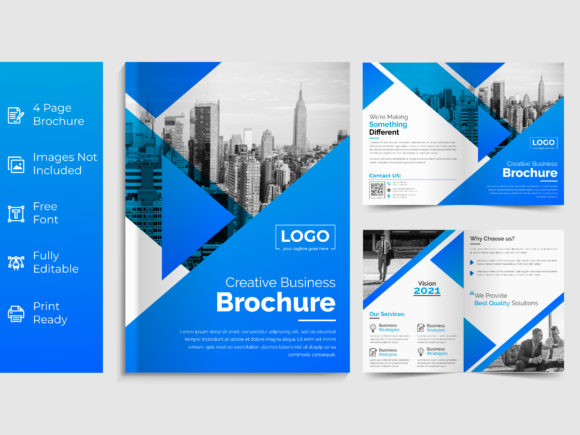
One of the most common mistakes beginners make is downloading a template without verifying its technical specifications. A robust Bi-fold Brochure Design Template should be built with precision. For instance, this specific template is created in Adobe Illustrator (AI), which is the industry standard for vector-based design. Unlike raster-based formats like JPEGs, vector files allow you to scale your content to any size without losing quality. This means whether you are printing on a small business card or a large banner, your text and logos remain crisp.
However, having the right software isn't enough. The internal organization of the file is equally critical. In a properly prepared file, every element—text, logo, color swatches, and image placeholders—is placed on separate, clearly named layers. If you open a template and find a chaotic mess of ungrouped objects, you are likely facing a nightmare during the editing process. This disorganization often leads to accidental deletion of essential elements or difficulty in updating specific sections. A template with fully organized layers allows you to swap out your logo, change the font, or adjust colors in minutes rather than hours.
The Critical Role of Print Readiness
Perhaps the most overlooked aspect of brochure design is the difference between screen resolution and print resolution. Many users save money by choosing cheap templates that are only 72 DPI (dots per inch). When printed, these designs appear pixelated and blurry, instantly damaging your professional reputation. A superior Bi-fold Brochure Design Template must be 300 DPI Print Ready. This ensures that every dot of ink lands exactly where it should, resulting in sharp text and vibrant images.
Furthermore, the physical dimensions matter. Using a non-standard size can confuse printers or result in wasted paper. This template adheres to the A4 International size, which is the global standard for business documents. By sticking to standard sizes, you ensure compatibility with commercial printing presses, avoiding extra charges for custom trimming or resizing.
Navigating Common Pitfalls in Template Selection
When evaluating a design resource, it is easy to get distracted by flashy previews. However, a responsible approach requires digging deeper into the specifics. Here are several areas where users frequently stumble when selecting and utilizing a Bi-fold Brochure Design Template.
- Misunderstanding Font Licensing: Many templates come with free fonts, but some are restricted to personal use only. If you plan to use the brochure for commercial purposes, such as selling a service or promoting a business, using a font without a commercial license can lead to legal issues. This specific template utilizes popular, free-to-use fonts like Raleway, which are generally safe for both personal and commercial projects, but always double-check the licensing terms provided with the download.
- Ignoring Image Exclusions: A frequent source of frustration is assuming the template includes the photos shown in the preview. Typically, Images are not included in the download package. Users must source their own high-resolution photography. Relying on low-quality stock photos or stretching images to fit the layout can ruin the aesthetic. Always prepare your images before opening the file to ensure they meet the 300 DPI requirement.
- Overlooking Color Variations: Corporate branding often requires different versions of the same document. A versatile template offers 1 Color Variation or multiple color swatch options. If a template locks you into a single color scheme, you may end up paying a designer to recreate the layout for a secondary project. Look for files that allow you to easily toggle between color themes to maximize utility.
- Assuming "Editable" Means "Easy": Just because a file says it is editable does not mean it is user-friendly. Some templates use complex clipping masks or obscure grouping methods that confuse novices. Ensure the template is described as Full Editable with intuitive layer structures. This feature allows you to replace text and logos without breaking the layout grid.
Maximizing Efficiency and Quality
To get the best results from your Bi-fold Brochure Design Template, adopt a methodical approach. Start by organizing your content before you touch the design software. Write your copy, select your images, and gather your logo files. Trying to write while designing often leads to awkward spacing and poor hierarchy. Once your assets are ready, open the AI file and verify the layer panel. You should see clear labels for "Text," "Background," "Logo," and "Images."
If you encounter any difficulties, remember that support is often available. Most reputable creators encourage users to reach out via their profile if they need help customizing the file. Whether you need to adjust the bleed area for a specific printer or require a special customization, direct communication can save you from making irreversible mistakes. Taking the time to understand the file structure pays off in the final output.
Evaluating Your Choice Before Committing
Before downloading or purchasing any design resource, take a moment to review the technical details. Ask yourself: Is the file in the correct format (AI)? Is the resolution set to 300 DPI? Are the fonts specified? Does it include instructions? These checks prevent the disappointment of buying a product that doesn't fit your workflow. A well-designed template saves you money in the long run by reducing the need for external design services and minimizing print waste caused by errors.
Ultimately, the goal is to create a brochure that speaks for your brand with clarity and impact. By choosing a template that is 100 Vector and 300 DPI Print Ready, you are investing in a tool that guarantees quality. Whether you are a beginner taking your first steps or a seasoned professional streamlining your operations, the right Bi-fold Brochure Design Template serves as a foundation for success. It transforms a complex design task into a manageable, efficient process, allowing you to focus on what truly matters: your message and your audience.
If you find value in this resource, consider leaving a rating for the item. Feedback helps creators improve their products and ensures that future users have access to high-quality, reliable tools. Thank you for prioritizing quality in your design choices.