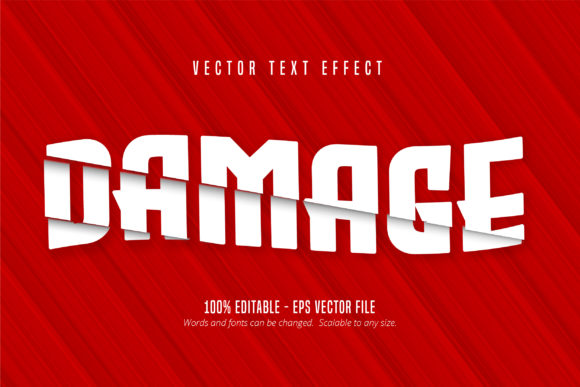
Damage Text, Cutout Style Text Effect for Bold Designs
There is a distinct energy in typography that refuses to sit quietly on a white page. It demands attention through texture, imperfection, and a sense of history. The Damage Text, Cutout Style Text Effect captures this raw aesthetic perfectly. It transforms standard letterforms into something that feels worn, torn, or reclaimed from the environment. This is not merely a font file you download and install; it is a sophisticated vector effect designed specifically for Adobe Illustrator. By understanding how to leverage this tool, creators can inject a layer of gritty realism into their projects without needing complex manual tracing or raster manipulation.
For designers, marketers, and small business owners, visual impact often hinges on the details. A clean, sans-serif logo might communicate professionalism, but a cutout style text effect suggests resilience, urban culture, or industrial strength. When applied correctly, this editable asset allows you to maintain the crispness of vector graphics while achieving the chaotic look of physical wear. Whether you are designing concert posters, streetwear branding, or bold social media banners, the ability to edit the text while keeping the damage intact is a game-changer for workflow efficiency.
Understanding the Asset and Its Capabilities
The core value of this resource lies in its format and flexibility. Delivered as an Adobe Illustrator EPS CS6 file, it ensures compatibility with professional design software while preserving the integrity of the vector paths. Unlike raster images that pixelate when scaled, these effects remain sharp at any size. You can shrink them for a mobile icon or blow them up for a billboard, and the edges will stay clean. The "cutout" nature implies that parts of the letters are missing or layered, creating depth and shadow play that flat fonts simply cannot achieve.
What makes this particularly useful is that it is fully editable. You are not stuck with pre-written phrases like "SALE" or "NEW." Instead, you can type your own copy, change the kerning, adjust the tracking, or swap out the font family entirely (provided the base structure supports it). The 100% editable feature means you have complete control over the content. If a client wants to change a word from "OPEN" to "CLOSED," you do not need to redraw the damage patterns. You simply update the text layer, and the effect applies instantly. This saves hours of manual labor and reduces the risk of inconsistency across a brand's visual identity.
Creative Applications Across Industries
The versatility of the Damage Text, Cutout Style Text Effect extends far beyond simple graphic design tasks. Different audiences can adapt this style to meet specific goals, whether they are educators creating engaging materials or entrepreneurs building a rugged brand identity.
- Event Marketing: For music festivals, skate competitions, or underground art shows, this style communicates rebellion and excitement. The cutout elements mimic the look of stenciled graffiti or weathered flyers found on city walls, instantly setting the mood before a user even reads the event details.
- Product Packaging: Craft beer labels, limited-edition sneaker boxes, and artisanal food packaging often benefit from a tactile feel. Using this effect on product names can make the item feel handcrafted or vintage, adding perceived value through visual storytelling.
- Digital Content: Bloggers and content creators can use these assets for featured images or YouTube thumbnails. In a feed full of polished, high-gloss imagery, a textured, damaged text effect stands out by breaking the visual pattern. It draws the eye and signals that the content inside is authentic and unpolished.
- Educational Materials: Teachers and trainers can use this style to create worksheets or presentation slides that feel less sterile. For history lessons about war, industrial revolutions, or urban development, the visual language of the text itself reinforces the subject matter.
Practical Strategies for Implementation
To get the most out of this effect, it is essential to approach it with intentionality. The goal is to enhance the message, not obscure it. Here are practical ways to integrate the Damage Text, Cutout Style Text Effect into your workflow effectively.
Maintain Readability First
The primary function of typography is communication. While the cutout style adds character, it should never compromise legibility. When applying the effect, test your designs at various sizes. Ensure that the negative space created by the "damage" does not merge letters together or make key information difficult to read. If the text becomes too fragmented, consider reducing the intensity of the effect or increasing the stroke weight of the letters.
Layering for Depth
One of the strengths of the EPS format is the ability to work with layers. Don't just place the text on a plain background. Experiment with placing the damaged text over textured paper backgrounds, halftone patterns, or photographic elements. The cutout sections allow underlying layers to peek through, creating a natural integration between the text and the image. This technique creates a cohesive composition where the text feels like part of the scene rather than an overlay.
Color Psychology
The color choice dramatically alters the interpretation of the damage. High-contrast combinations, such as black text on white or neon yellow on dark gray, evoke urgency and industrial vibes. Softer pastels with subtle damage effects can suggest nostalgia or decay in a romanticized way. Consider the emotional response you want from your audience and select colors that align with that feeling. The effect works best when the color complements the texture rather than fighting against it.
Tips for Consistency and Organization
When working with multiple text blocks or long documents, consistency is key to maintaining a professional look. Since the file is scalable and editable, you can create a master style guide. Save your preferred text configurations as symbols or styles within Illustrator. This ensures that every instance of the Damage Text, Cutout Style Text Effect across a campaign looks uniform.
- Name Your Layers Clearly: Separate the text content from the effect layers. This makes it easier to toggle visibility or adjust the opacity of the damage without affecting the letter shapes.
- Use Global Swatches: If you plan to use specific colors for the effect, define them as global swatches. This allows you to update the color theme across the entire document with a single click if the brand guidelines change.
- Export Correctly: Always export your final files in formats suitable for your medium. For print, ensure you export high-resolution PDFs or TIFFs. For web, optimize SVG or PNG versions to balance quality with file size.
Balancing Creativity with Functionality
While the artistic potential is vast, the utility of this tool relies on disciplined application. It is easy to overuse textures, leading to a cluttered design that confuses the viewer. The Damage Text, Cutout Style Text Effect is powerful because it adds a specific narrative element: the story of wear and tear. Use it sparingly to highlight key headlines, logos, or calls to action. Let the surrounding elements remain cleaner to provide contrast.
For freelancers and agencies, offering this style as part of a premium branding package can be a strong differentiator. Clients looking for a unique, non-generic look appreciate the effort required to achieve a custom texture. By providing an editable source file, you empower the client to make future updates without losing the original design intent. This builds trust and encourages long-term relationships.
Ultimately, the success of this effect depends on the designer's eye. It requires an understanding of balance, contrast, and hierarchy. When used thoughtfully, the Damage Text, Cutout Style Text Effect transforms ordinary words into compelling visual statements. It bridges the gap between digital precision and analog chaos, offering a versatile solution for anyone looking to make their mark in a crowded visual landscape.